
Everything in one focused app

One app, every part of the fretboard.

redLUX Guitar isn't a single trick. It follows the natural arc of making music — hear the key, build the progression, see the notes that matter, solo over it, and write the song. Every area below works fully offline, on iPhone and iPad.

Harmony

Start with the key, not a blank page

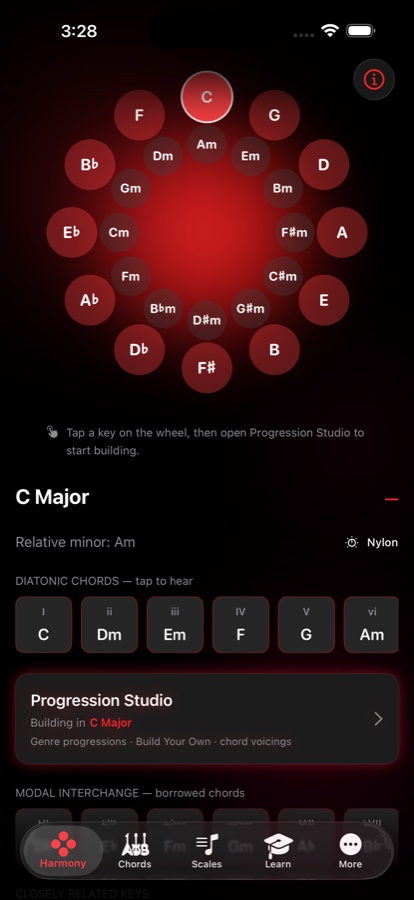
The Circle of Fifths wheel is where every session begins. Tap a key to hear its diatonic chords, see its relative minor and closely related keys, and jump straight into Progression Studio with that key already loaded.

  • Every diatonic chord for the key — tap any one to hear it
  • Modal interchange: borrowed chords laid out next to the home key
  • One tap into Progression Studio, already building in your key
Harmony screen with the Circle of Fifths wheel, C Major selected, its six diatonic chords listed below, and a shortcut into Progression Studio
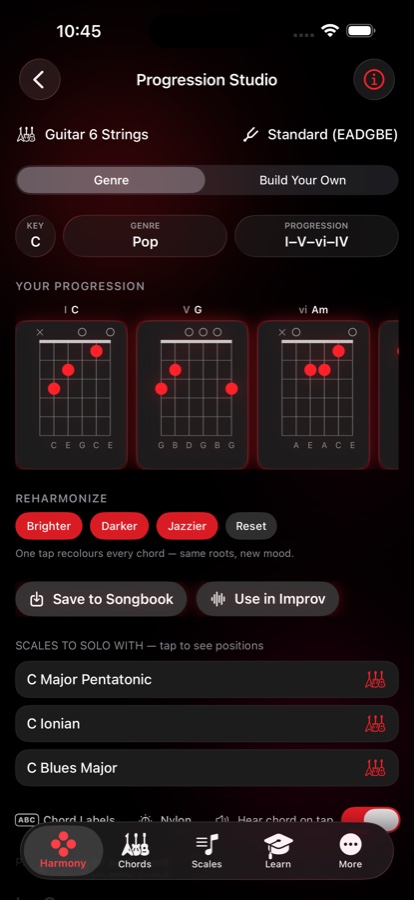
Progression Studio with a I-V-vi-IV progression in C, chord diagrams for each degree, Reharmonize buttons and a list of scales to solo with
Progression Studio

A progression worth playing, in seconds

Start from a proven progression across 23 genres, build a modal progression from the mode you pick, or roll a random one drawn only from progressions that actually work. Then make it yours.

  • One-tap Reharmonize: Brighter, Darker or Jazzier recolours every chord while keeping the same roots
  • Suggest next chord when you're stuck, and borrow from modal harmony for unexpected colour
  • Matching scales appear right below the progression, ready to tap into a solo sheet
  • Press and hold a chord card to pick it up, then drag to reorder or upward to delete
  • Save to Songbook, or send it straight into Improv
Scales & Fretboard Maps

Designed for intuition, not memorisation

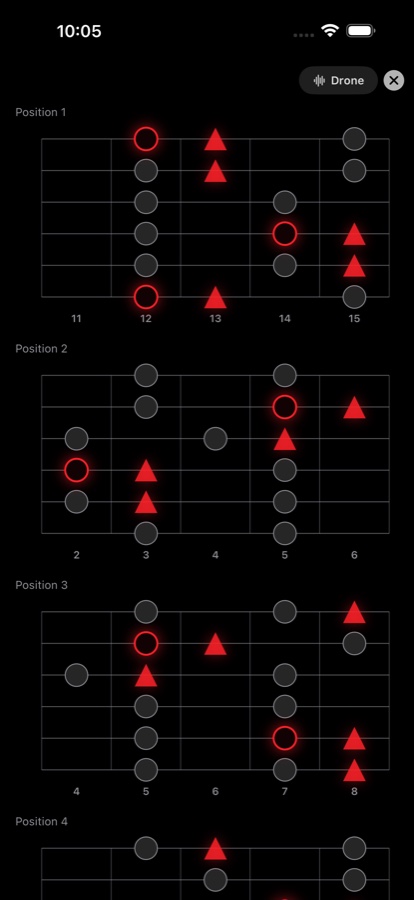
Most scales here are built on a pentatonic backbone, so the shape teaches you the sound. The tonic is a ring you can't miss. Characteristic flavour notes appear as triangles — not just a different colour, but a different shape you can spot out of the corner of your eye. Stable foundation notes stay as quiet grey dots.

  • Every essential scale and mode, plus exotic and world scales, in clear position boxes
  • Multiple fingering positions per scale, with an optional full-neck view
  • Toggle scale-degree labels (1, ♭3, 5…) on or off over the diagram
  • Chord-aware suggestions show which scales fit the chords you're actually playing
  • Works across every tuning, plus 7- and 8-string, bass and ukulele
Scale positions stacked down the screen, each fretboard showing the tonic as a red ring, flavour notes as red triangles and foundation notes as grey dots
Why Shapes, Not Just Colors

Two shapes. Every mode unlocked.

Most guitarists already live inside the pentatonic box — it's muscle memory. Instead of asking you to learn a brand-new seven-note pattern for every mode, redLUX overlays that same familiar shape with a second, distinct shape for the notes that actually define the mode's character.

🤚

Built on muscle memory you already have

A mode isn't a new pattern to memorize — it's the pentatonic box you already know, plus two notes. Look at an A Dorian map and the A minor pentatonic jumps out immediately; the triangles simply show where the major 6th and major 2nd slot in to transform it.
🎯

Triangles are your target tones

Modal soloing means intentionally landing on the notes that create a mode's flavor. Stick to the circles for a safe, familiar sound, or aim for the triangles to unlock something specific — Phrygian's brooding ♭2, Dorian's bright 6th — instead of wandering.

Shapes beat colors

Color-coding breaks down in bright sun and for colorblind players. Two distinct geometries read instantly, even in your peripheral vision, so you can spot the flavor notes without ever looking away from the strings you're fretting.

🔍

See exactly where you went wrong

Hit a clashing note while practicing a mode? Glance at the map and see exactly which triangle you lingered on too long — and why. Modal tension stops being abstract theory and becomes something you can point to.

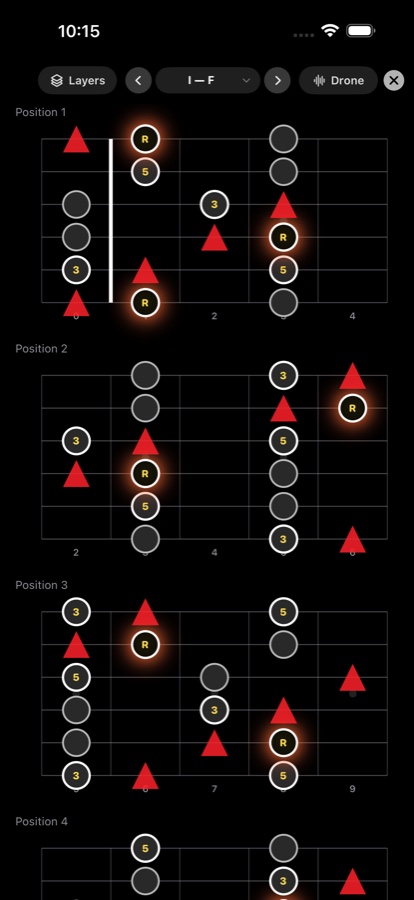
Scales screen in Layers mode with a chord layered over each scale position, chord tones ringed in gold, and a drone control in the top bar
Layers Mode

Watch the chord tones move under your fingers

Layers puts one chord at a time on top of the scale, so you can see exactly which notes land on the chord you're playing over. Step through a progression and the highlighted tones move with it.

  • Put a chord on top of any scale position and step through your progression
  • In full screen, swipe left or right to change chord and double tap to change view — both hands stay on the guitar
  • Pair it with the drone to hear the tension resolve as you move
Full-Screen Practice

One scale, zero distractions

Strip away everything but the fretboard. Full-screen mode goes edge to edge in landscape or portrait, with every position for the scale stacked and ready.

  • Optional root or root-and-fifth drone in your key, so you can actually hear the scale's character
  • Landscape shows the full neck; portrait stacks positions for focused practice
  • Dark enough to be easy on tired eyes at two in the morning
Distraction-free full-screen scale view with stacked fretboard positions and a discreet drone toggle
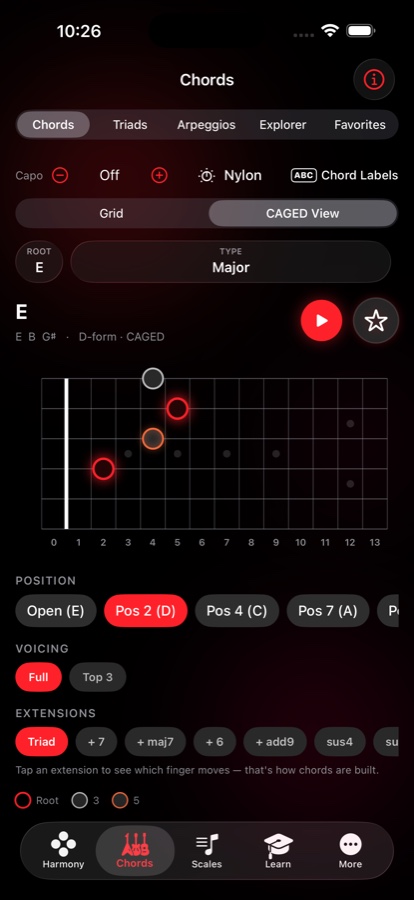
Chords tab in CAGED View showing an E major D-form shape at position 2, with position and extension pickers below the fretboard
CAGED View

One chord, five places, one finger at a time

Slide any chord shape through all five CAGED positions up the neck and see exactly how they connect — the moment every player chases. Then tap an extension and the ghost dots show which single finger moves to turn that shape into a maj7, a 6, an add9 or a sus.

  • All five forms for any chord, in order up the neck, with the position and form named
  • Tap an extension to see which finger moves — that's how chords are built
  • Full voicing or top three strings — every CAGED position is free; the one-finger extensions are Pro
Chords & Voicings

Every voicing, including the rare ones

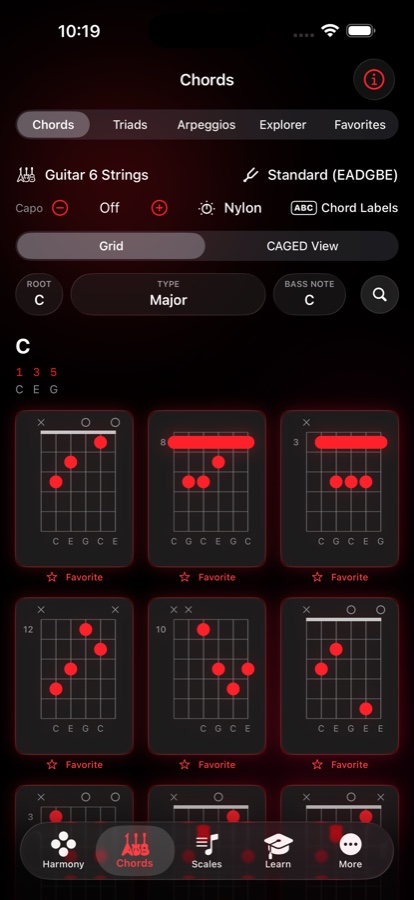
A searchable library of every chord type, with inversions and slash chords — the common shapes and the complex, rarely-documented ones — so you keep discovering harmonic colours instead of settling for the first shape that fits.

  • Chords, Triads, Arpeggios, Explorer and Favorites, all from one tab
  • Double tap any chart to open it full screen at extra large size, then swipe through every voicing
  • Barre markings drawn over the dots the way real chord books do it
  • Truthful scale-degree labels per voicing — 1 5 9 ♭3 for an add9, not a guess
  • Chord Explorer: place notes on the neck and the app names the chord
  • Star any voicing into Favorites, organised into folders you control
Chord voicings grid for C major showing nine playable diagrams with note names, barre markings and a favourite star under each
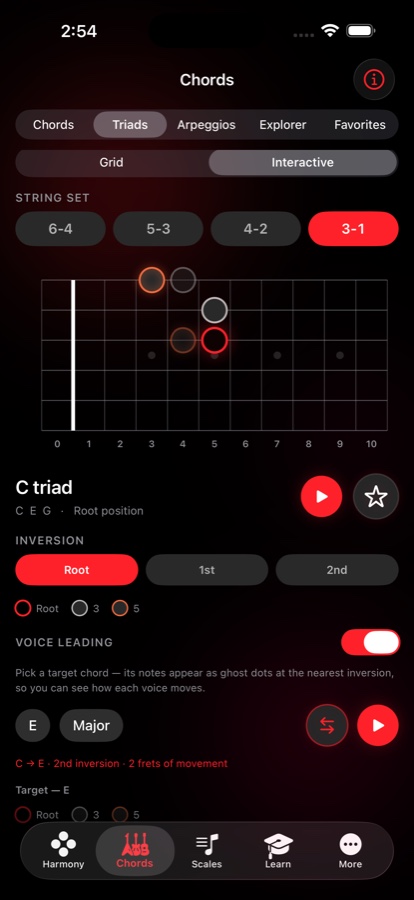
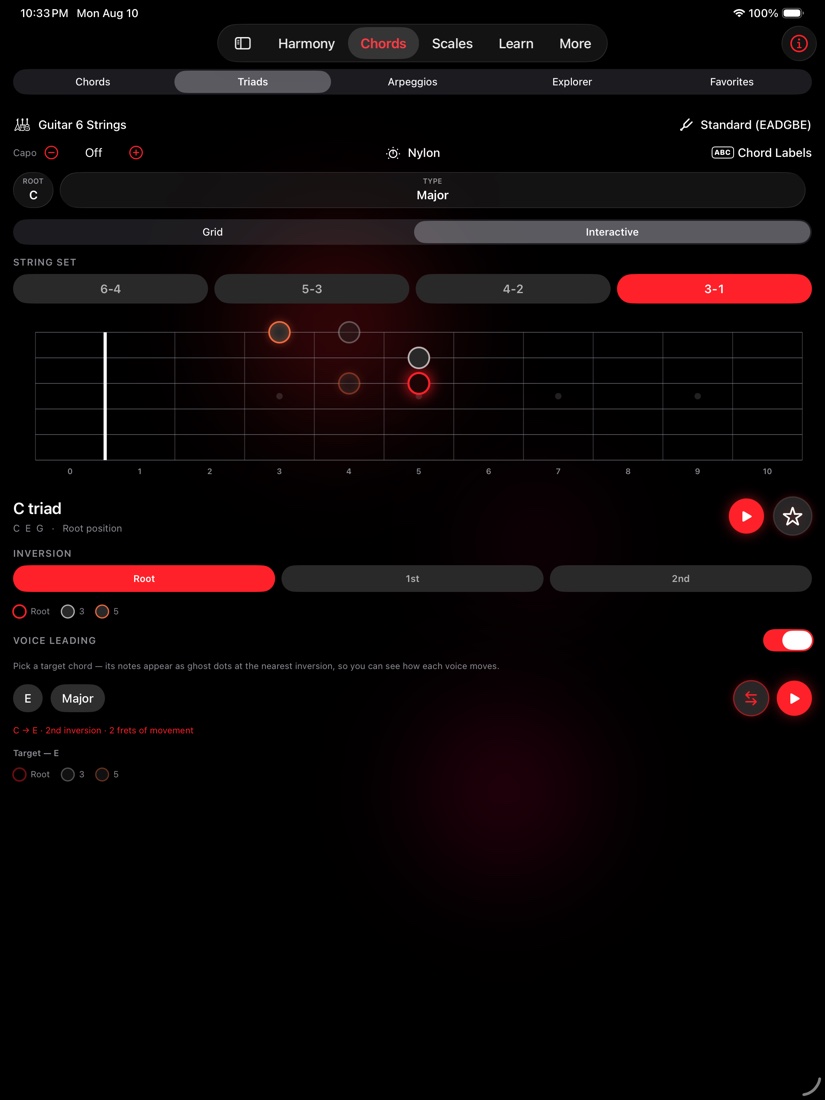
Triads tab in Interactive mode showing a C triad on the 3-1 string set with voice-leading ghost dots for the target E chord
Triads & Voice Leading

The shortest move between two chords, drawn on the neck

Every three-note shape on every string set, in root position and both inversions. Turn on Voice Leading, pick a target chord, and its notes appear as ghost dots at the nearest inversion — so you can see exactly how each voice moves.

  • String sets 6–4, 5–3, 4–2 and 3–1, each with root position and both inversions
  • Voice leading names the move: "C → E · 2nd inversion · 2 frets of movement"
  • Swap the target into the main slot to chain a progression one chord at a time, starring each step to Favorites
Songbook

From a jam to a finished song

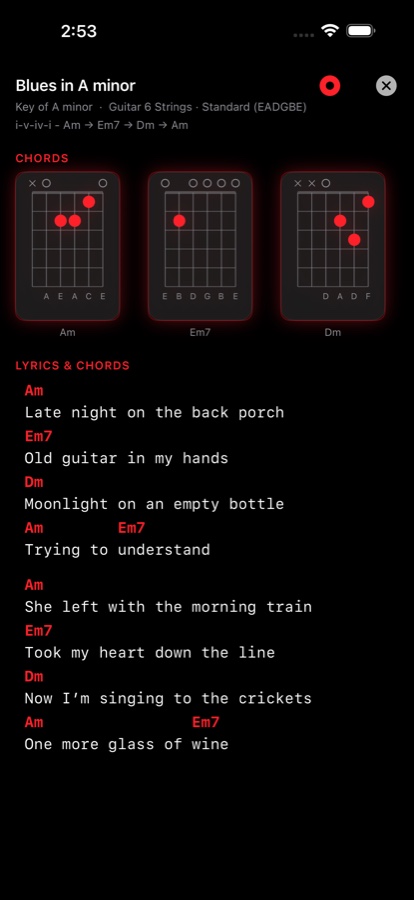
Add lyrics directly against your chords, organise your growing repertoire, transpose with smart capo suggestions, and print or export when you're ready.

  • Chord symbols sit colour-coded right above the lyric line they belong to
  • Smart capo suggestions transpose without changing your fretting-hand habits
  • Export a printable song sheet carrying the chords, scales and arpeggios you chose
  • Rework any song back in Progression Studio whenever inspiration strikes again
Songbook entry for an original called Blues in A minor, with chord diagrams at the top and lyrics beneath colour-coded chord symbols
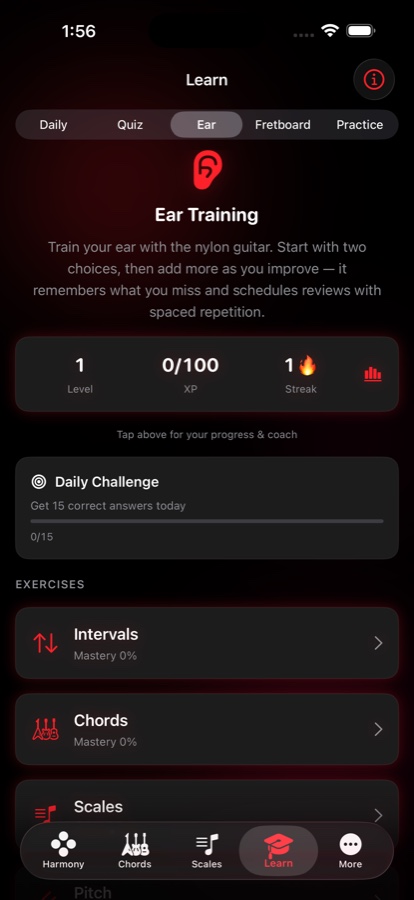
Learn tab showing Ear Training with level, XP and streak counters, a daily challenge, and mastery progress for intervals, chords and scales
Learn

Ear training and theory, in minutes

Short ear-training games and theory quizzes built for a commute or a waiting room — something better to reach for than mindless scrolling.

  • Daily, Quiz, Ear, Fretboard and Practice modes, each tracking mastery separately
  • Spaced repetition remembers what you get wrong and schedules the review for you
  • Daily streaks and a daily challenge keep you consistent without pressure
  • Deep-dive theory essays for when you want the long answer
Studio Utilities

The essentials, done properly

A tuner you will actually reach for and a metronome that does more than click — both built in, both offline.

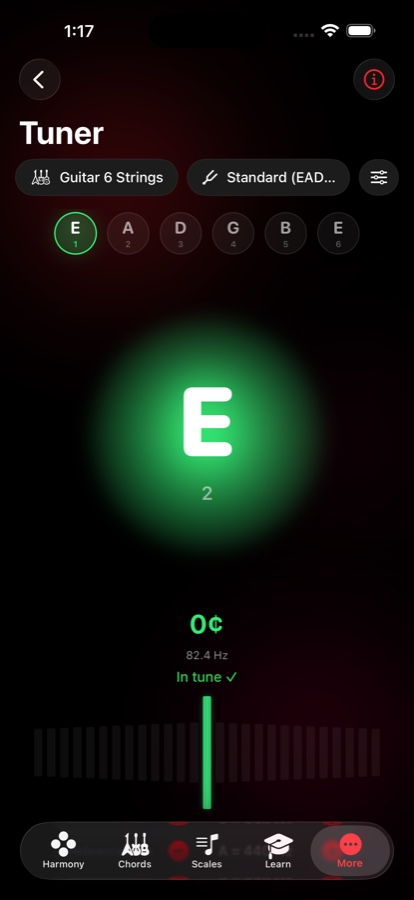
Tuner screen showing the low E string in tune at 82.4 Hz, with a glowing green orb and a bar display beneath

Tuner

Fast, accurate chromatic tuning with automatic string detection. Choose a Needle, Bar, Strobe or Waveform display, set your reference pitch, filter out room noise, and mirror the whole thing for left-handed players.

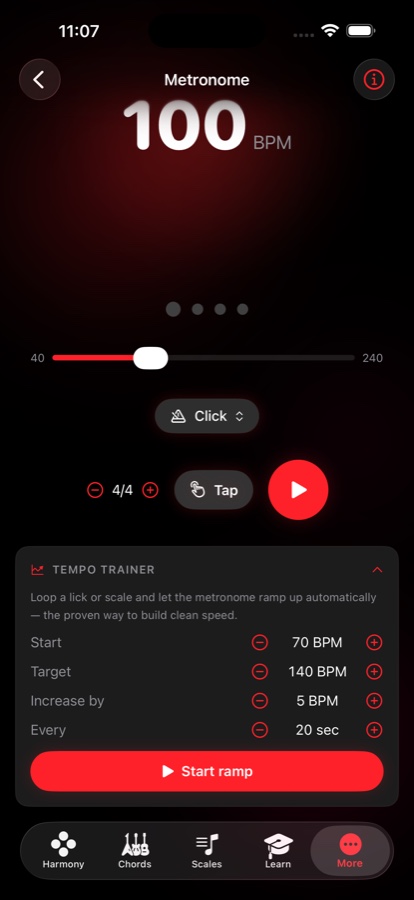
Metronome screen set to 100 BPM with tap tempo, time signature controls and a tempo trainer that ramps from 70 to 140 BPM

Metronome & tempo trainer

Real drum grooves instead of a bare click, tap tempo, and a tempo trainer that ramps the BPM automatically while you loop a lick — the proven way to build clean speed.

🎚

Improv & solo sheets

Build a solo sheet from a key, your own chords, or a Songbook import: the scales, positions, arpeggios, triads and voicings for your song, gathered on one page. Swipe an item away to drop it, and reopen the sheet exactly as you left it.

Backing tracks & recording

A backing-track library with folders, and recording in perfect sync over any track — adjustable mix, USB-C input support, and a take library to play back, rename and share.

Favorites & folders

Star any chord, triad or voice-leading pair into folders you control, with quick reordering and search — your own reference book, built as you go.

🌍

Built for everyone

Guitar (6, 7 and 8-string), bass (4 and 5-string) and ukulele, any tuning and capo. Full left-handed support, high contrast, bigger tap targets, bold text, reduced motion, Dynamic Type and VoiceOver — in eight languages.

redLUX Guitar on iPad showing the Triads tab in Interactive mode, with a wide fretboard, string-set picker and voice-leading controls laid out across the screen
On iPad

The same studio, with room to breathe

redLUX Guitar is a universal app. On iPad the navigation moves to a sidebar-friendly layout, the fretboards get room to stretch, and solo sheets can show their diagrams in two columns — a layout that carries straight into full screen.

  • Two-column solo sheets, in the app and in full screen
  • Wider fretboards for CAGED View, Triads and Layers Mode
  • Content stays centred and readable instead of stretching edge to edge

An Android version is in the works

redLUX Guitar is being rebuilt for Android. It's actively in development — no release date to promise yet. The iPhone and iPad app is available today.

Standalone by design

No accounts to create. No ads to dismiss. No usage data leaving your device. redLUX Guitar works completely offline after download — even in the middle of nowhere.