Instant progressions
Start from proven progressions across 23 genres, build modal progressions from the mode you pick, or roll a random one drawn only from progressions that actually work.
Most scale apps show a wall of identical dots. redLUX builds on the pentatonic boxes already in your fingers, then marks the one note that gives each scale its character — the ♯4 behind Lydian, the ♭2 behind Phrygian. Then it helps you turn that into music: progressions, solos, and finished songs. Entirely offline. No accounts. No ads.
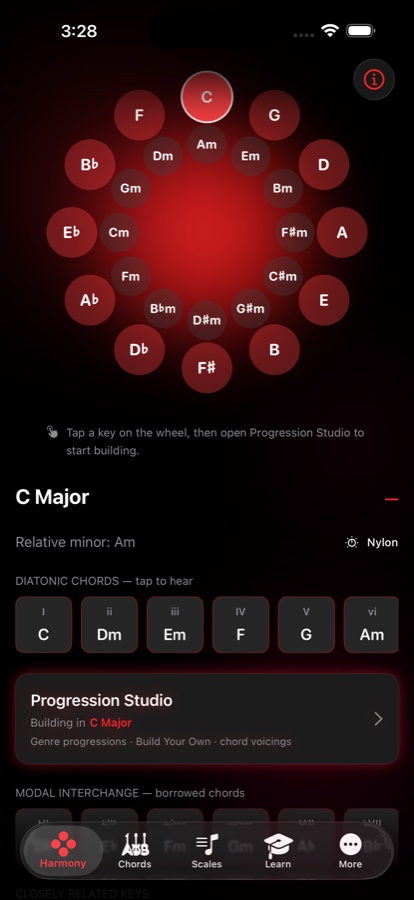
Everything that happens between picking up a guitar and finishing a song — in one focused, glare-friendly app built for late-night sessions.
Start from proven progressions across 23 genres, build modal progressions from the mode you pick, or roll a random one drawn only from progressions that actually work.
Circles are the pentatonic box you already know. Triangles mark the note that gives the scale its flavour.
See one chord in five places up the neck, and the single finger move that turns each shape into its extensions. The connection every player chases, finally visible.
Every three-note shape on every string set. Pick a target chord and watch each note glide to its nearest shape — the shortest move between two chords, drawn on the neck.
Turn a jam into a real song with lyrics above the words, transpose with smart capo, and print a song sheet carrying the chords, scales and arpeggios you chose.
Four tuner displays with automatic string detection, a metronome with a tempo trainer and drum grooves, and recording in perfect sync over any backing track.
The latest update brings redLUX to Apple Watch and Android, and makes every diagram easier to read.
Tuner, metronome and tempo trainer with haptic beats, key and tempo detection, the chords and scales from your Songbook, Chord Craft, and redLUX Breathe — a box-breathing session that can save Mindful Minutes to Apple Health.
redLUX Guitar is on Google Play: the same studio, rebuilt for Android phones and tablets.
C7 reads B♭, not A♯, and borrowed chords take their proper names — on every chart, scale and progression.
Double tap a scale or arpeggio diagram to switch between degrees, note names and no labels, and hold to peek. In Layers Mode, swipe to change chord and double tap to change the view.
Walk a whole progression pair by pair. Voice Leading starts in the key your first chord implies, and a double tap on the neck changes its labels.
redLUX now speaks German too — nine languages in all. Plus a tuner that no longer reads a note an octave low in a noisy room.
"I built the tool I always wished existed — something I'd rely on every night, even in the middle of nowhere. No signal. No excuses. Just creation."
— Frank, creator of redLUX Guitar
The full studio, rebuilt for Android phones and tablets: Progression Studio, scales and Layers Mode, CAGED View, voice leading, Songbook, tuner, metronome and recording. Free to start, with the same one-time Pro upgrade.

No accounts, no ad trackers, no subscriptions. Free to download with core features included — with an optional one-time Pro upgrade that unlocks the full toolkit. One payment, yours forever.